Documentation Index
Fetch the complete documentation index at: https://docs.idunplatform.com/llms.txt
Use this file to discover all available pages before exploring further.
Connect your Idun agent to Discord so users can interact with it through slash commands in any server.
Prerequisites
- A running Idun agent (engine)
- A Discord account
- Your engine must be publicly reachable (use ngrok for local development)
Setup
Open the integrations catalog
Navigate to Integrations. The channel catalog shows WhatsApp, Discord, and Slack as active channels. Teams, Telegram, LINE, Notion, and Google Chat are planned.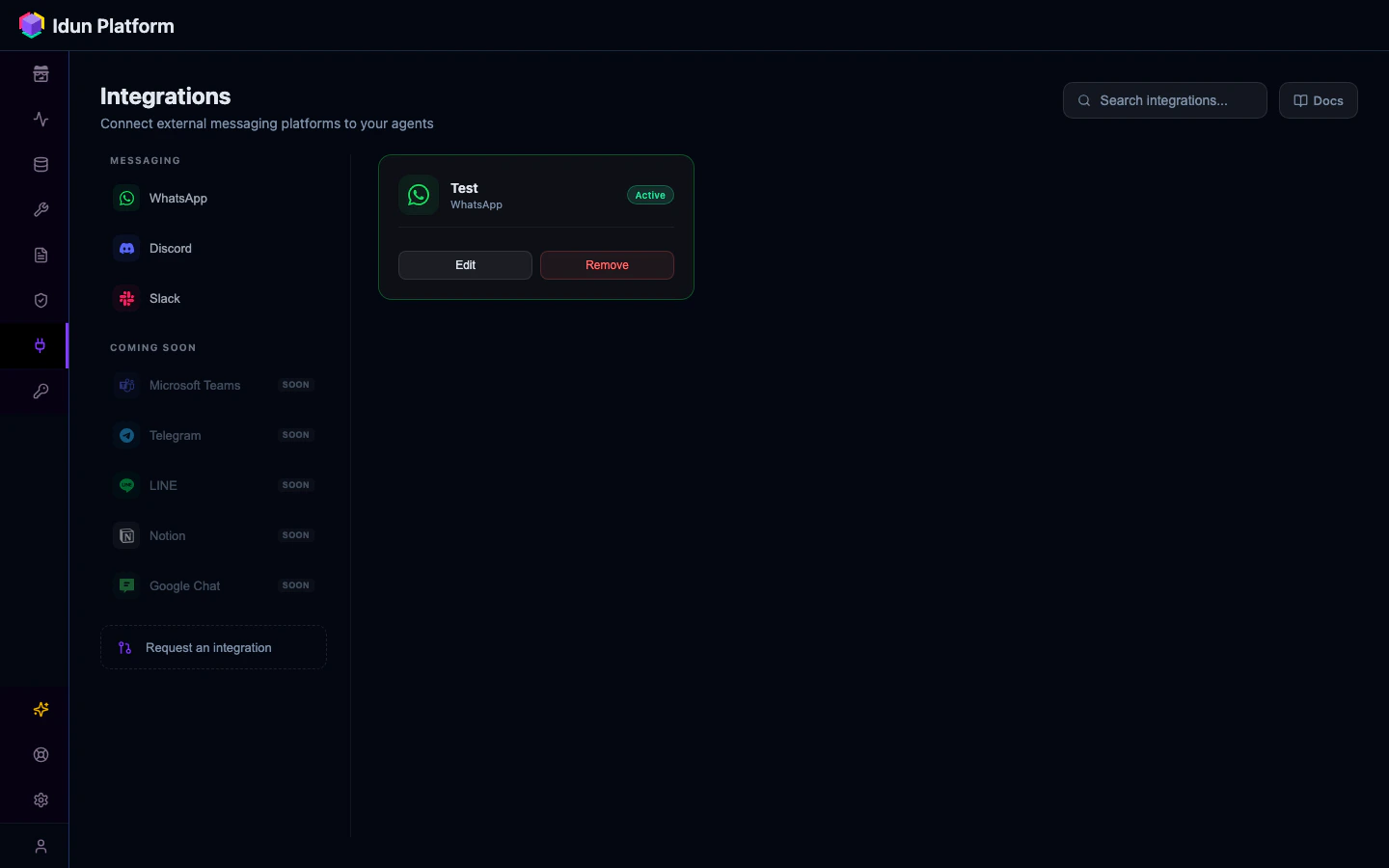
Create the Discord integration
Click + on Discord and fill in the form:| Field | Value |
|---|
bot_token | Bot token from your Discord application |
application_id | Application ID from the Discord Developer Portal |
public_key | Public key from the Discord Developer Portal |
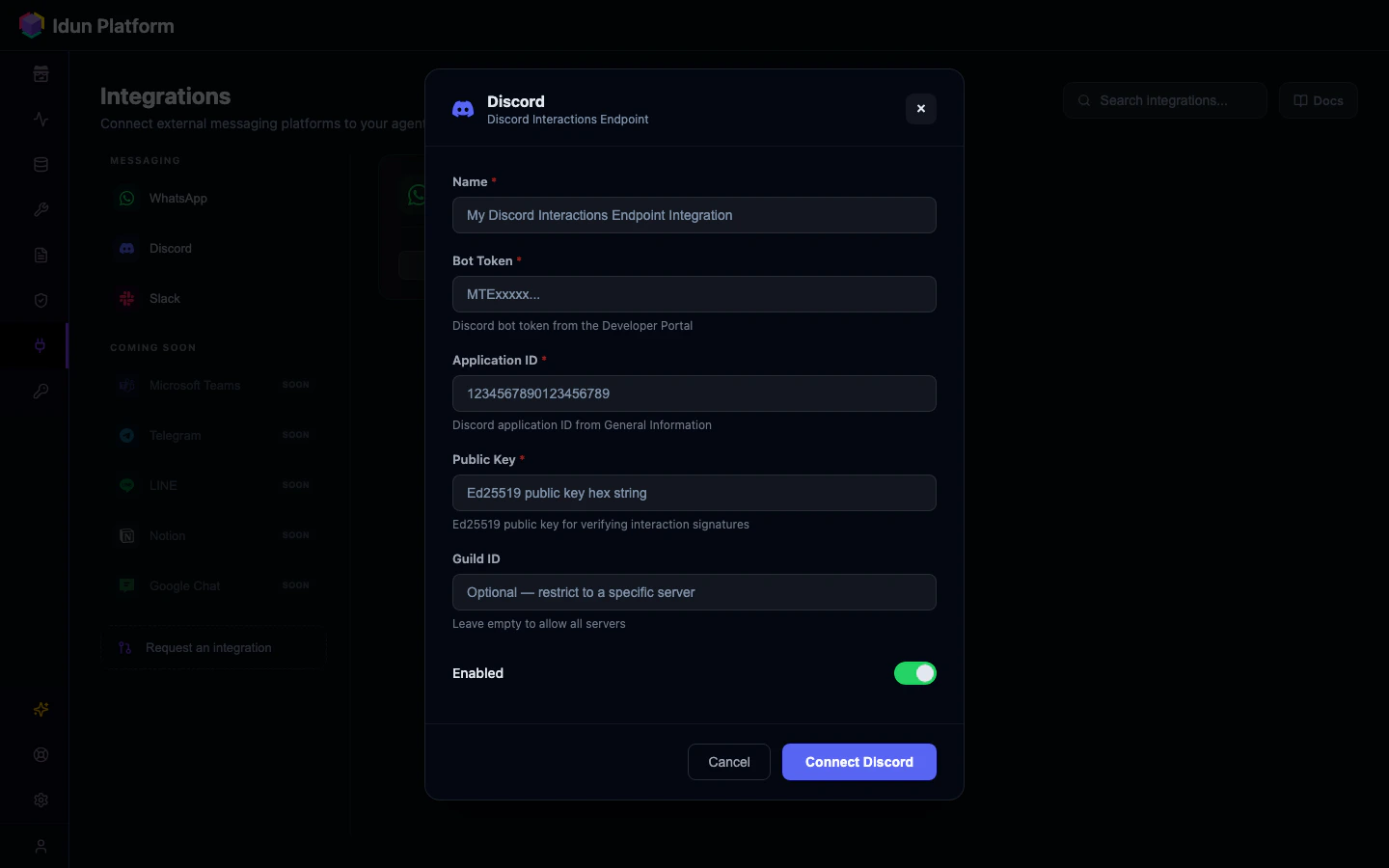
Assign to an agent
After saving, open the agent you want to connect and select the Discord integration from the Integrations field.
Create a Discord application
- Go to the Discord Developer Portal
- Click New Application and give it a name
- On the General Information page, copy the Application ID and Public Key
Create a bot
- Go to the Bot tab
- Click Reset Token to generate a Bot Token
- Copy the token immediately (it is only shown once)
Invite the bot to your server
- Go to OAuth2 > URL Generator
- Select scopes:
bot, applications.commands
- Select bot permissions:
Send Messages
- Copy the generated URL, open it in your browser, and select your server
- To get your Guild ID: enable Developer Mode in Discord settings (User Settings > Advanced > Developer Mode), then right-click your server name and select Copy Server ID
Configure the integration
Add the Discord integration to your engine config:integrations:
- provider: "DISCORD"
enabled: true
config:
bot_token: "MTI..."
application_id: "123456789012345678"
public_key: "abcdef1234567890..."
guild_id: "987654321098765432"
| Field | Description |
|---|
bot_token | Bot token from step 2 |
application_id | Application ID from step 1 |
public_key | Public key from step 1 (used for Ed25519 signature verification) |
guild_id | (Optional) Your Discord server ID. If set, slash commands are scoped to this server and appear instantly |
Set the interactions endpoint URL
- Make sure your engine is running and publicly reachable
- In the Discord Developer Portal, go to General Information
- Set Interactions Endpoint URL to:
https://<your-domain>/integrations/discord/webhook
Register a slash command
Discord does not create commands automatically. Register them via the Discord API.Register a guild command (appears instantly in your server):curl -X POST \
"https://discord.com/api/v10/applications/{APPLICATION_ID}/guilds/{GUILD_ID}/commands" \
-H "Authorization: Bot {BOT_TOKEN}" \
-H "Content-Type: application/json" \
-d '{
"name": "ask",
"description": "Ask the agent a question",
"options": [
{
"name": "query",
"description": "Your question",
"type": 3,
"required": true
}
]
}'
{APPLICATION_ID}, {GUILD_ID}, and {BOT_TOKEN} with your values."type": 3 means a STRING option. The engine extracts this as the query text sent to your agent.
To register a global command (available in all servers the bot is in), omit /guilds/{GUILD_ID} from the URL. Global commands can take up to 1 hour to appear.
Test it
- Go to your Discord server
- Type
/ask query: Hello
- The bot shows a “thinking…” indicator (deferred response), then replies with your agent’s answer
How it works
- User sends
/ask query: ... in Discord
- Discord POSTs the interaction to your engine’s webhook
- Engine verifies the Ed25519 signature
- Engine defers the response (Discord requires a reply within 3 seconds)
- Engine invokes the agent asynchronously with the query text
- Engine edits the deferred message with the agent’s reply
Session tracking: The Discord user ID is used as the session ID, so conversation context is maintained per user.
Message limit: Discord messages are capped at 2,000 characters. Longer replies are truncated.
